Get started with a free trial.

Unlock seamless gym access through the Fitness First app
Fitness First is transitioning gym access exclusively to the Fitness First App - no more access cards! Currently, Digital Access is available at select locations below, with plans to roll it out across all clubs soon.
Available exclusively to Fitness First members
Download the app now! Check out our FAQs below for help with logging in.
Clubs using Digital Access
If your club isn’t listed, you’ll still need your access card for entry until Digital Access is implemented.
NSW
Get started with the app

1. Download the Fitness First app.

2. Login with your username and password. If you don't know your password, tap 'forgot password'.

3. If you have an iPhone turn on Bluetooth and if you have an Android turn on NFC.

4. Start using the app to access your club.
Accessing the gym with the Fitness First App
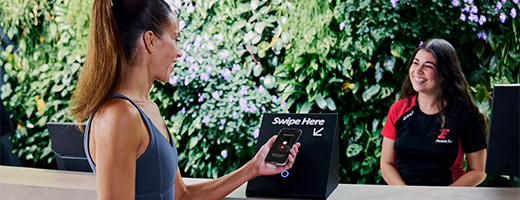
During staffed hours
Open your app, select the digital access button and hold your phone to the reader on the front desk.

Outside staffed hours
Open your app, select the digital access button and hold your phone to the reader at the 24/7 entry. *24/7 access available at select clubs.
Frequently Asked Questions
What do I need to do?
To access our clubs with your phone, download and log in to the Fitness First App. The Fitness First App is available to download on Google Play and the App Store. You can find and download the App by using the links below:
Log in with the username and password used when you joined Fitness First.
When will my club transition to digital access?
Digital Access will progressively go live across all Fitness First Clubs in stages. Please keep an eye out for any emails, SMS notifications and in club signage for more information on when Digital Access will go live in your local club. Please ensure you're subscribed to all Fitness First Health Clubs communication to stay up to date with all the news.
You can find a full list of clubs using digital access here.
Can I continue training at other Fitness First clubs?
If you have a Platinum Plus or higher membership you can continue to train at any of non-Digital Access Club locations nationwide using your Fitness First access card. If you are interested in upgrading your membership to get all club access, please speak with our team in club or contact us.
Accessing the app
How do I download the Fitness First App?
The Fitness First app is available to download on Google Play and the App Store. You can find and download the app by using the links below:
Simply login with the username and password you created when you joined Fitness First. By completing this step, you can simply log in and start using the Fitness First App straight away after downloading.
What’s my username?
Your username is the email address you used when you joined Fitness First. If you need to check your email address or update it, please contact us.
How do I log in to the Fitness First App?
Access the Fitness First App with the username and password used when you joined Fitness First. If you don't remember your password or you did not set up a password, then follow these steps:
Download the app if you haven't already
Open the Fitness First App
Tap "Forgot password"
Enter your email address
If there’s an account with your email address, you’ll receive an email with instructions to set up a new password
Log into the app using your email address and the password you have just created
If you can’t reset your password, please contact us so we can help.
How do I reset my password?
On the Fitness First App login screen, tap the ‘Forgot password’ link and submit your email address. If there’s an account with your email address, you’ll receive an email with instructions to set up a new password.
The link in the password reset email has expired
You can resend the password reset email by requesting a new password on the Fitness First App login page. Once you receive the email, you will have 60 minutes to reset your password.
I didn’t receive a password reset email
Please check your spam/junk/promotions or other email folders for a password reset email from Fitness First. If you still can’t see the email in your inbox, please contact us so we can help.
I see an “account issue” error
This might happen if something has changed on your account. If the message is still appearing after a 24 hour period, please contact us.
How do I unlock my account?
Too many unsuccessful login attempts on the Fitness First App will cause your account to lock. In this case, you will receive an email with instructions to unlock your account and set a new password.
I have a different issue or the troubleshooting above hasn’t worked for me
Contact us and we’ll get back to you.
Accessing the gym with Digital Access
Why can't I see digital access in my app?
Not all clubs have digital access installed, check the list above to see if your club is using digital access. If the club you want to use is on the list and your phone shows digital access is still deactivated, please talk to your club team or contact us to help you resolve this issue.
I've downloaded the app and logged in, but it says my digital access is disabled.
Please tap on the digital access card or move to the profile screen in the app for further details on why your digital access may be disabled. For further assistance, please talk to your club team or contact us to help you resolve this issue.
I've downloaded the app and logged in, but it is showing “unsuccessful” on the digital access screen.
Please close the app and reopen it. If unsuccessful is still shown, please log out and back in. If the issue persists, please talk to our club team or contact us so that we can check your account.
I’ve downloaded the app and logged in and it is showing my digital access pass but when I hold it to the reader nothing happens.
If you have an iOS device, please ensure you have Bluetooth turned on. You will also need to accept Bluetooth permissions within the app which will pop up on first open. If you did not do this when you first downloaded the app you can go into settings, scroll to the Fitness First app and switch on Bluetooth permissions.
If you have an android device, please ensure NFC is turned on and try again.
My digital access was working but now it is saying access disabled.
Please speak with our club team or contact us for assistance.
Operating Software Version requirements
The Fitness First App requires Android 10 or higher, or iOS 14 or higher to operate. If your device does not support this or you are unsure, please see your in-club team or contact us for assistance.
My phone doesn’t have NFC
If your device does not support NFC or you are unsure please see your in-club team or contact us for assistance.
Can I use the app across multiple devices?
You can login to the app across multiple devices. However, digital access will only be available in your registered device. When you first log into the app and activate digital access you will be asked to register that device.
If you need to register a different device, you can do this by logging into the app on a new device. The app will recognise that the device is new and ask if you want to register that device instead. This can only be done twice in a 28 day period. For further changes, please contact us.
What if I use multiple Fitness First gyms at various locations?
Please check the list of clubs that have been switched to digital access. You will need to continue using your existing access card if you are planning on visiting a gym that doesn’t have digital access yet.
How do I use the card activated lockers in my club?
If you want to continue to use card activated lockers, please retain your membership card and swipe it at reception on each visit to activate it for locker use. Locker use is only available during staffed hours. Card activated locker access is only available at select clubs.
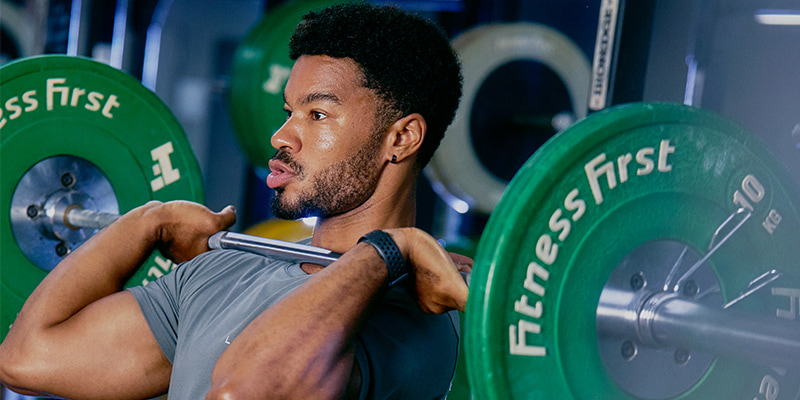
Accessing the gym with the Fitness First app
Open your app, select the digital access button and hold your phone to the reader until it turns green.